

Invoices
OpenLinker can issue fiscal documents for orders and, where the connected provider supports it, submit them to a tax authority for clearance — for example Poland’s KSeF system. This section covers the Invoices list, the invoice detail page, and the per-order invoice panel embedded in Order detail.
Prerequisites
Section titled “Prerequisites”Invoicing is capability-gated per connection, the same way ProductMaster or OfferManager are. Before you can issue an invoice you need at least one active connection with the Invoicing capability enabled — for example a KSeF connection (ksef.publicapi.v2), Subiekt GT (subiekt.gt.v1), Subiekt nexo (subiekt.nexo.v1), or inFakt (infakt.accounting.v1). See Connecting a Platform for how to add and activate one.
If no active invoicing connection exists, the Invoice panel on an order’s detail page does not render at all, and the Invoices list shows no data. If a connection exists but is in error or needs_reauth status, the panel shows a Re-authenticate prompt linking to that connection instead.
Invoices list
Section titled “Invoices list”Open Invoices in the sidebar (under Operations).
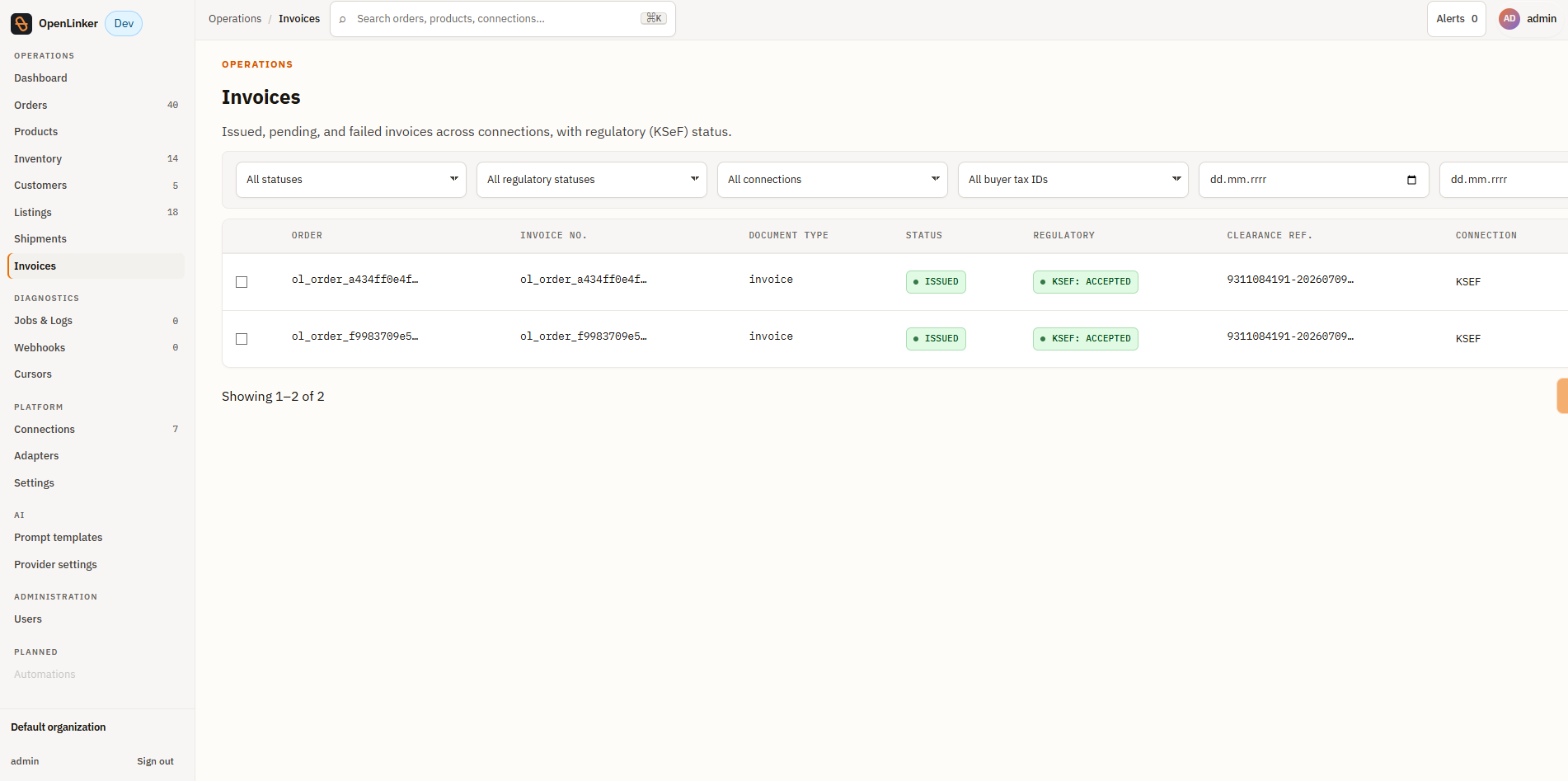
Filters
Section titled “Filters”| Filter | Values |
|---|---|
| Status | pending, issuing, issued, failed |
| Regulatory status | submitted, accepted, rejected (KSeF-style clearance; not-applicable and cleared are excluded from the filter as noise/unused) |
| Connection | Any configured invoicing connection |
| Buyer tax ID | With tax ID / Without tax ID |
| Issued from / Issued to | Date range |
Columns
Section titled “Columns”| Column | Description |
|---|---|
| Order | The marketplace order number the invoice was issued for, linked to the order, over the first item name and a +N count. Copy writes the full internal order ID (ol_order_*) — the button says so. When the order can’t be resolved the number falls back to a shortened internal ID, still linked. |
| Document type | Two lines: the provider-assigned document number over the document type (Invoice (faktura), Receipt (paragon), Correction (korekta), Credit note (nota kredytowa), Proforma (faktura pro forma), Prepayment (faktura zaliczkowa)). The number links to the PDF when the provider ships one, and is copyable when it doesn’t (KSeF and inFakt ship no PDF URL). A record that hasn’t been issued yet has no number and no type, so it reads — over Not yet issued. |
| Status | Derived display status — see Invoice statuses below |
| Regulatory | Clearance status with the connected tax authority, when applicable |
| Clearance ref. | The authority-assigned reference (e.g. KSeF number), once cleared |
| Connection | Which invoicing connection issued the document: its name (linked) over a shortened, copyable connection ID, plus a status note when the connection needs attention. Hidden below 1024 px. |
| Issued | Date the document was issued |
Invoice statuses
Section titled “Invoice statuses”| Status | Meaning |
|---|---|
| pending | Issue request accepted, not yet confirmed by the provider |
| issuing | An issue attempt is in flight and the row is locked — no action is available while this runs |
| issued | Document successfully issued |
| failed (rejected) | The provider rejected the request — nothing was issued, safe to retry once the underlying issue is fixed |
| failed (in-doubt) | The request timed out or was interrupted — a document may already exist on the provider. OpenLinker never offers a one-click Retry here, to avoid creating a duplicate; use Check provider to verify manually |
⚠️ Fiscal safety. Retry is only ever offered for a
failedrow whose failure mode isrejected. Any ambiguous or unknown failure is treated as in-doubt and shows Check provider / Mark resolved instead of a blind retry — this is deliberate, to prevent double-issuing a fiscal document.
Bulk actions
Section titled “Bulk actions”Select one or more rows with the checkbox column to reveal the bulk-action bar:
- Issue invoices — issues invoices for the selected rows’ orders. Orders that already have an issued invoice (or one in progress) are skipped; issuance is idempotent per order.
- Retry selected — retries only the rows eligible for retry (
failed+rejected); everything else is skipped with a reason.
Both actions show a result banner with counts (issued/retried, skipped, failed) after completion.
Invoice detail
Section titled “Invoice detail”Click any row to open /invoices/:invoiceId.
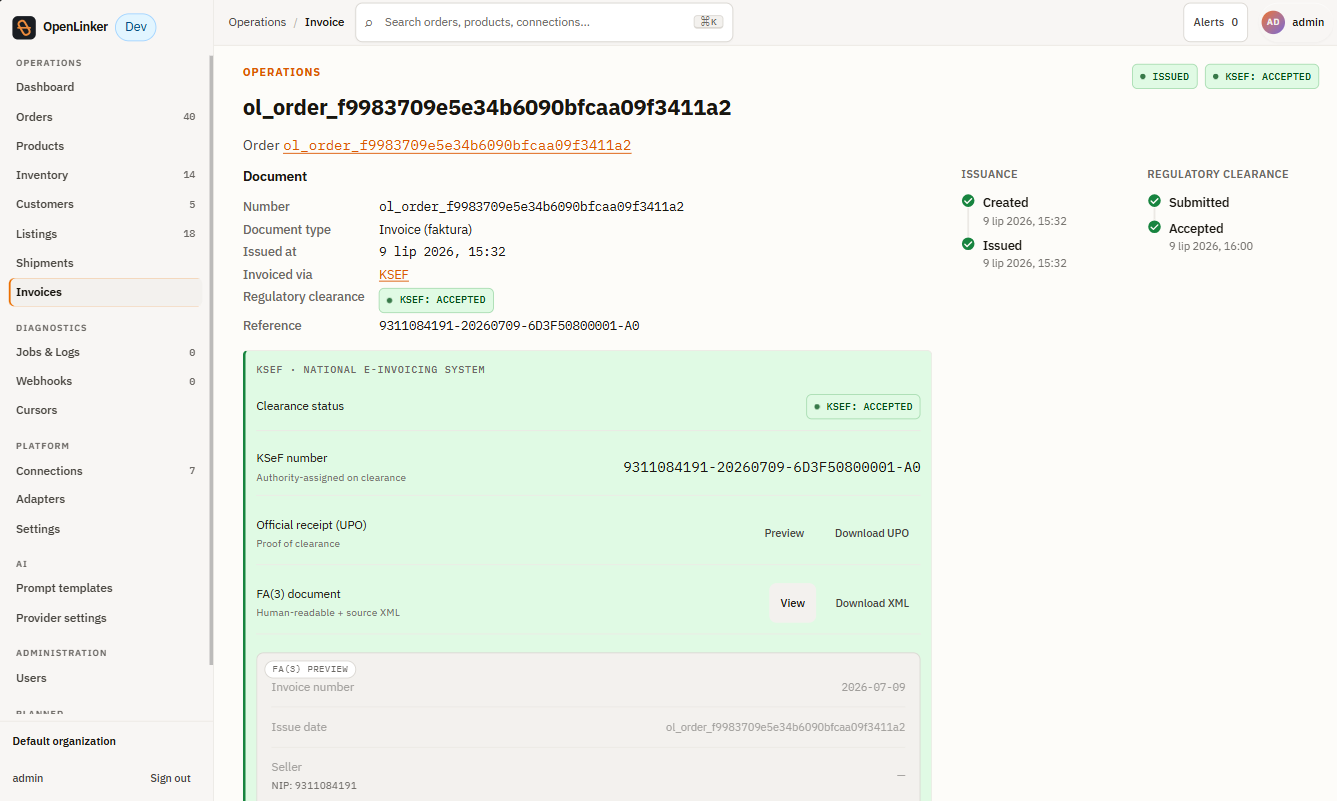
The page shows:
- Document — invoice number, document type, issued date, invoicing connection (“Invoiced via”), and regulatory clearance status + reference.
- Issuance / Regulatory clearance — the dual timeline for the document: when it was created and issued on one side, when it was submitted and accepted by the tax authority on the other.
- Provider extras panel — provider-specific detail below the timeline (for KSeF: clearance status, the authority-assigned KSeF number, an Official receipt (UPO) preview/download, and the FA(3) document preview/download as XML).
- Failure/in-doubt alert + actions — when the invoice failed or is in-doubt, a banner appears above the Document block with contextual actions: Retry (rejected failures only), or Check provider / Mark resolved (in-doubt failures).
Order-level invoice panel
Section titled “Order-level invoice panel”Every order’s detail page (Orders) embeds an Invoice panel scoped to that order:
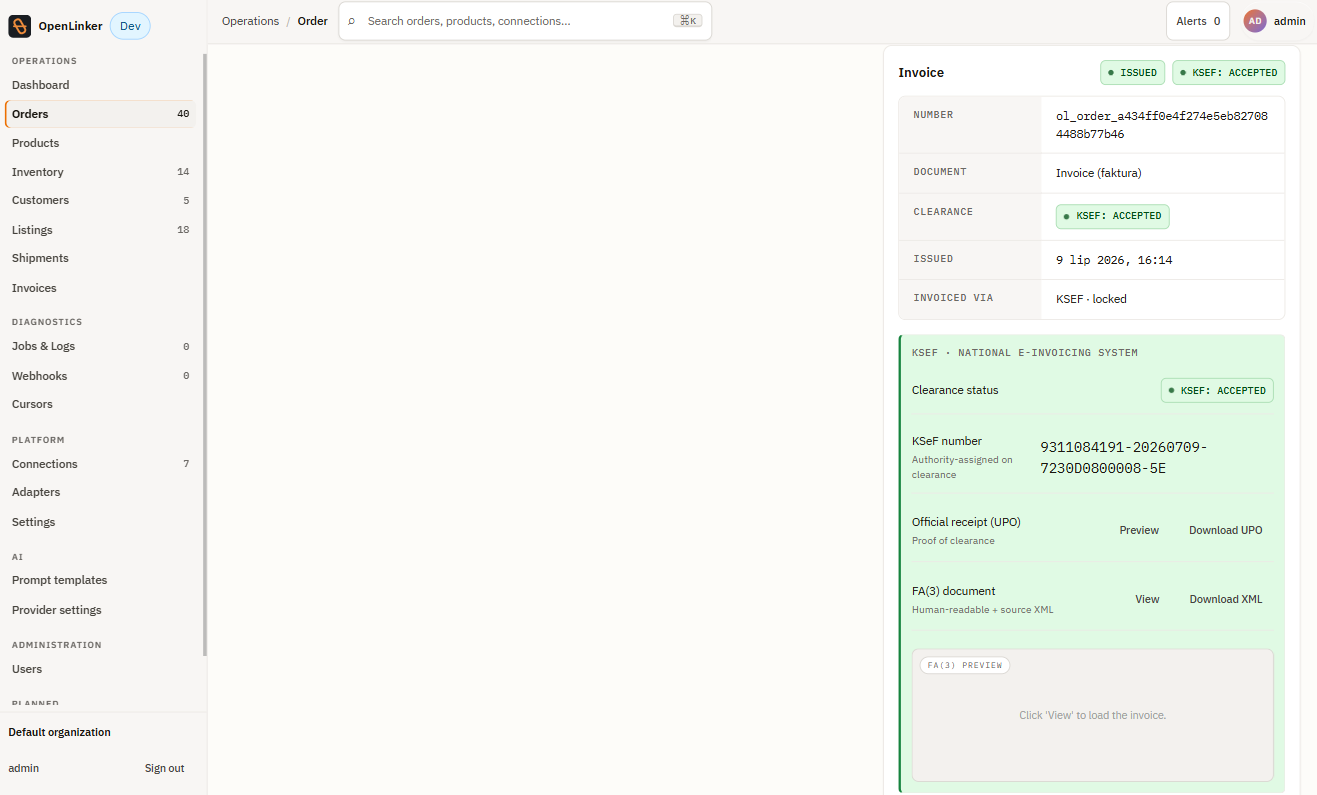
- Not issued — shows a document-type selector and an Issue invoice button.
- Pending / Issuing — a locked, read-only notice; the panel refreshes automatically when the provider responds.
- Issued — a read-only summary (number, document type, issued date, clearance status, invoicing connection) plus an Issue correction action when the connected provider supports corrections (e.g. KSeF FA(3)
KORdocuments). - Failed (rejected) — an inline error with a Retry button.
- Failed (in-doubt) — an inline warning with Check provider / Mark resolved, no Retry.
- Needs reauth — shown when the only matching invoicing connection has lost its access; links to that connection to re-authenticate.
If more than one active invoicing connection is configured, the panel shows a connection picker before you can issue or view the invoice for that order.
Issuing a correction
Section titled “Issuing a correction”Clicking Issue correction on an issued invoice opens a per-line correction dialog. For KSeF, this issues a FA(3) KOR document — the correction resubmits a complete document rather than a delta, since KSeF has no delta-only correction primitive:
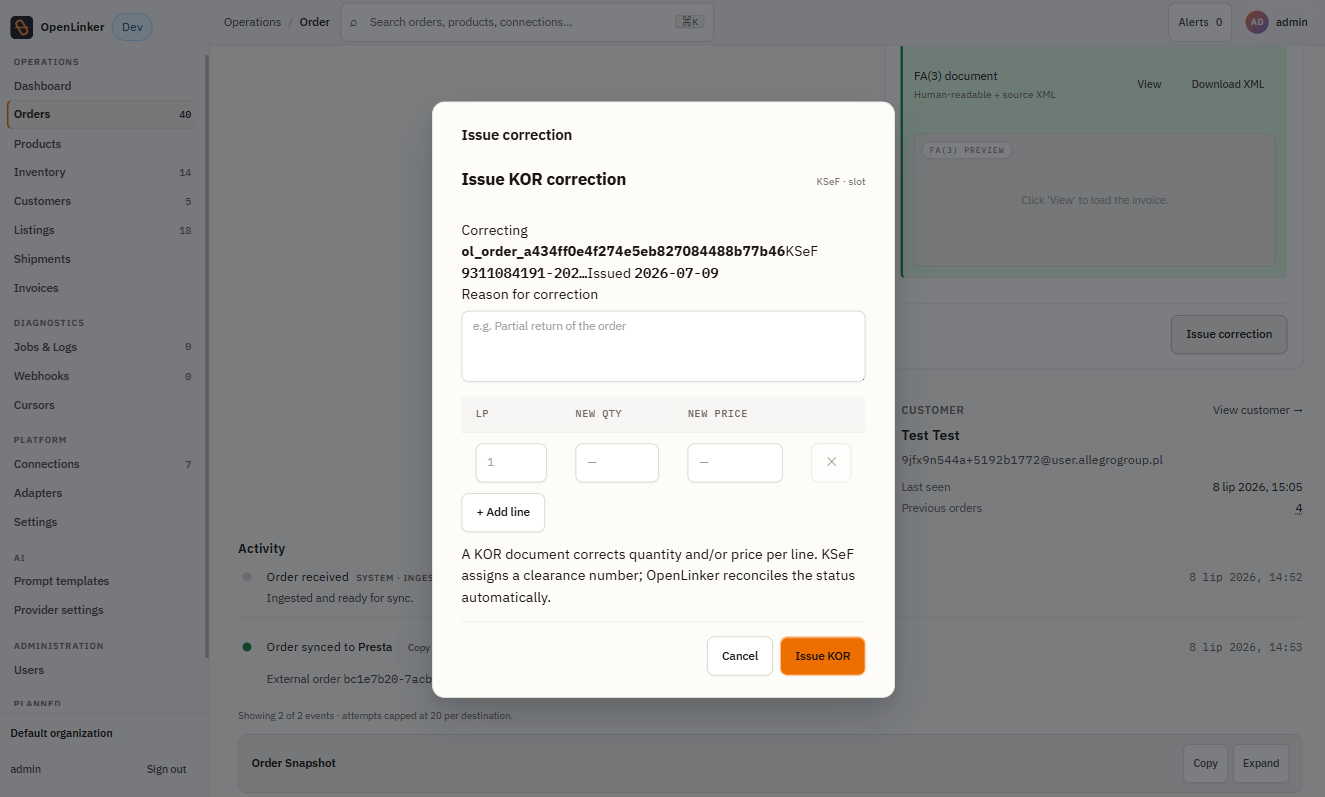
Enter a reason for correction, adjust the quantity and/or price per affected line (+ Add line for more lines), and submit. OpenLinker reconciles the corrected document’s clearance status automatically once the provider responds.
Emailing and downloading
Section titled “Emailing and downloading”Where the invoicing connection supports it, an issued invoice can be emailed to the buyer (choice of PL/EN document language, with an optional copy to the operator) or downloaded as a PDF via the invoice-number link shown throughout the list, detail, and panel views.
What’s next
Section titled “What’s next”→ Listings & Offers — create marketplace offers from your synced catalog
Don’t have an invoicing connection yet? See Connecting a Platform → Invoicing providers to add one (KSeF, Subiekt GT, Subiekt nexo, inFakt).